Hello eveyone~
This time I want to not only show the timelapse process but also addressing some question regarding brushes and techniques that I use during the whole Trial of Ink process.
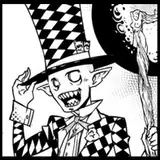
As I mentioned before, I almost exclusively use this ink brush for all of my line works (https://assets.clip-studio.com/ja-jp/detail?id=1700658) But why do I prefer this one instead of the default pen?
It’s because of the roughness that the custom one has compared to the smooth default pen. Some people might not like it because of the rough edges. But when replicating a traditional media looks, which is what I’m aiming for, I want to also replicate the roughness and imperfection of pen strokes.
This might be a small difference, but as you use it for a complex lineart and use it to make textures and crosshatching, you can see the difference between the line quality more.

(You can't hardly see the difference? yup, but when you do more complex and fine lines, you can see the roughness it creates)
Some people asked me how I made some of the texture and shading I used in my inking. There are several brushes and tricks that I use for that. Most of the tools I use, except one, is a default tools in CLIP Studio Paint.
This is the most common tools I use to make a shading, texture, ‘color’, and gradation in my ink works. I’m using mostly default setting of ‘Spray’ Airbrush. Because I decided not to use grey, when I want to make a gradation, I can’t use soft brush since it’ll decrease the saturation and create grey. So instead, I use spray to keep the opacity of the ink but create a screentone-like effect. I also use it to indicate an object with darker color. controling the particle size, pen pressure, and the density, I can give varying different shade to an object.

I sometimes use ‘spray + erase’ and sprinkle it across the entire artwork to deliberately create ‘imperfection’ to the inking.
Crosshatch and Line shadow brush is used as a shortcut to make a texture and shadow. Combining Crosshatch, line shadow, and spray allow me to create various different texture an shade. Important note to this, I always try to break the pattern by using spray or crosshatch + erase (1st image - 3rd step, and 2nd image - 4th step) so that it won’t looks too neat and digital.


Unfortunately line shadow isn’t a free asset, but the content of the brush pack is really useful if you’re looking for a good vegetation brushes :
https://assets.clip-studio.com/en-us/detail?id=1731427
------------------------------------------------------------------------
To be honest, I’m not too good at making tutorials, but I hope this will give some insight on what I did during this timelapse. If you have any further question, feel free to leave a comment or mention me in our discord server, I’ll be happy to answer any question or give more tips~ :D