Party Mode full guide
Added 2023-09-01 17:02:23 +0000 UTCParty mode is here! To activate it, you must go to options and select the party mode.
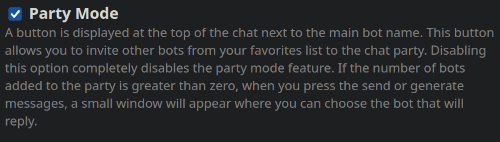
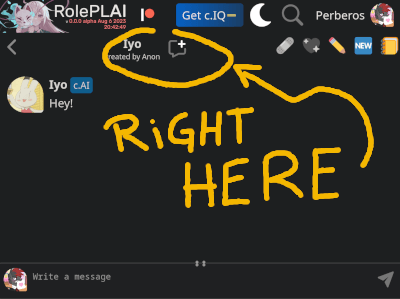
This will cause a button to be displayed at the very top of the chat, to the left of the familiar chat buttons.
To consider
- THERE IS A BUG: It's not really a bug, just my laziness. In new chats, the characters you add won't be saved until you send a message. After that, you need to refresh the chat to see if the character group list was saved.
- keep in mind: I rushed some things, maybe some edges, or elements are not well adjusted. I saw a lot of bugs while pushing this version, but I am extremely exhausted to fix them now.
- If you don't see the button, refresh the page (Ctrl+F5 on Desktop). Be sure to press Save button when activating party mode in settings.
- The character list is based on the favorites list. In case you already don't know, the heart button with sparks add bots to favorites.
- Adding and removing characters in the list is immediate, no need to press the save button.
- It is possible to enable and disable party mode at any time. There is no penalty for activating and deactivating party mode. The list of characters is saved to use later in the same chat.
- Party mode also works in Rogue-like mode. But it only let you choose the bot that should respond when sending a message, because generating options is disabled.
- It is possible that the bot write the wrong character lines or a few, in that case you should ignore that message and generate another one. And also cross your fingers.
Manage the party
This is a very simple step. Just tap on the characters on the list and it will swap the character position.
In simple words, Party list at top, Available at bottom. Tapping them moves to the opposite list.
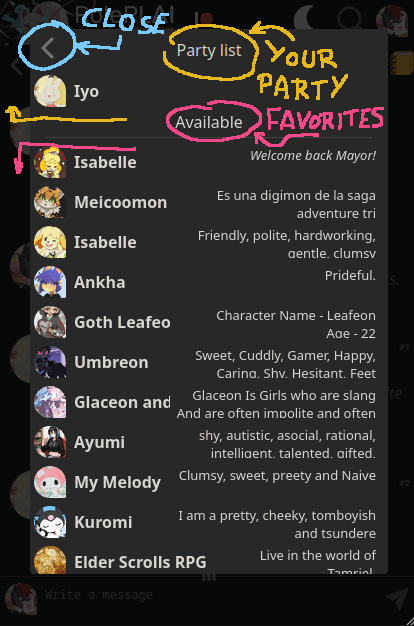
Yes... There is no quantity limit. But don't abuse it! You're going to break the potato server!
Also, the first one is the host character, it can't be removed.
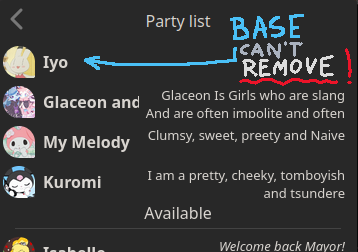
Then press the back button or any place outside the list and all is set up to use them.
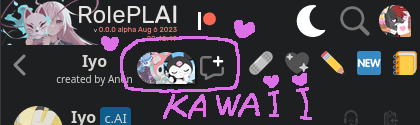
You can modify the list any time.
Selecting characters
There are two ways to summon the bots. Yeah, it won't be random like in... you know. I like the idea of being able to choose who is going to answer, because I needed some control to keep a good flow of the role.
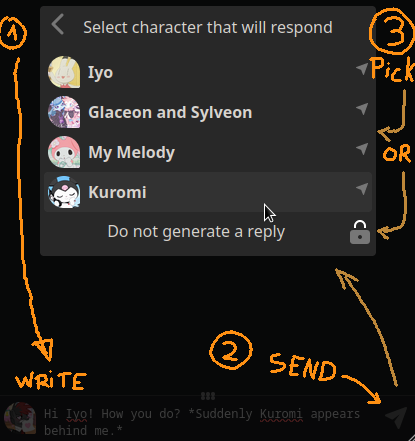
And the two possible ways are, when sending a message, and when generating a response.
Sending a message
In case of sending a message, you can select no generate a reply. This has a great benefit, you will not use the AI, but the chat will be unlocked immediately so you can write another message. Why? To use the feature that allows you to use your own bots. I will explain later what this function consists of, which was introduced a long time ago but was not announced. I'm very stealthy, hehe.
Generate a message
The advantage of the button to generate an answer is that it allows you to choose any other character to answer in case you didn't like his answer or you got the wrong character. You have full control of the chat!
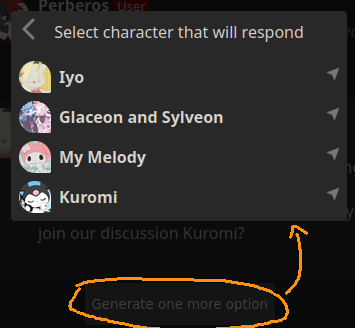
Replying to bot messages with another bot
The forward button allow you to alternate between the characters. How? Simple use the button to forward and press Generate one more option, it will make the AI reply the last message selected, in this case, an AI message.
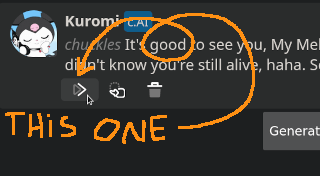
So in theory, you could already have almost complete control of the role-play.
This is an example of the generated chat with 3 AI characters and me.
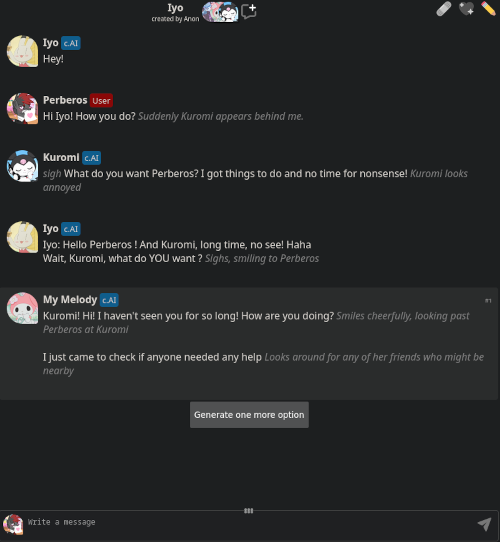
Additional details that are obvious but are ignored by some people
A couple of suggestions to keep in mind, when you write a message, make sure you choose the character that will respond well. But remember, these are not mandatory, they are to help you in case the AI does not respond as you expected.
_ _
I'll give you an example of how NOT to use it.
*Perberos turns to see Bowsette.* Hello, how are you? *stares at her*
So you select Korone to respond, well... she'll probably reply "I'm fine, thanks" or greet both. It's 50 50.
_ _
It's always a good idea to add details that characters introduce for the first time.
As I was saying, do you want a piece of Korone cake? *At that moment, we both felt a sinister energy, and quickly a shadow moved towards the arm where the cake was and was snatched away. Looking up, it was switchy that she was already eating half the cake.*
Yes, you guessed it, it's a good idea to use Switchy to generate a response. You'll probably respond something like "Yummy cake."
Although you could also use Korone to say something about the cake or Switchy.
Character selection feature
This is a feature that I have introduced a long time ago in a hidden and unannounced way. The intention of not announcing it was so that the C.AI devs do not steal the idea from me (?)
To enable it, go to options and look for the option.
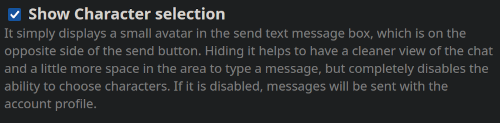
Once enabled, it will display your small photo profile in the send message box. This allows you to change your own identity. Unlike the party mode list, the profile you can choose is based on your own list of bots that you have created.

Pressing the icon will display a list of your own bots, as mentioned above. And at the bottom is to select the account profile.
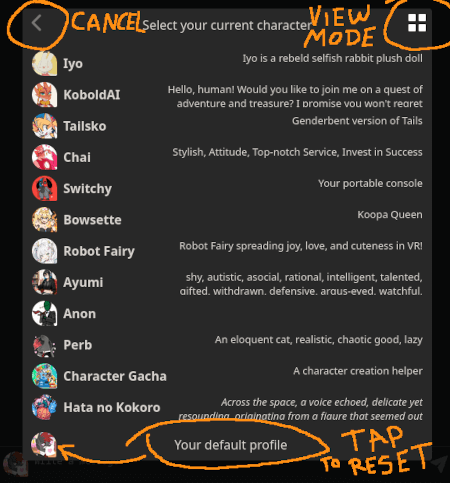
It is also possible to change the view mode to grid.
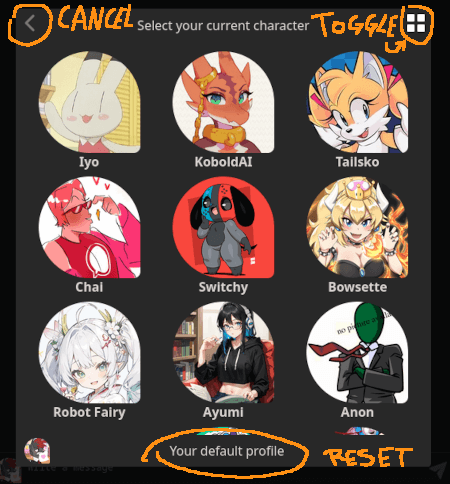
Choosing the bot will replace the small image with the selected one.
And from that moment on, the messages sent will have the name of that character.
To go back to the account profile, simply choose "Your default profile".
Impersonate, aka edit posts
Using this choose character mode, you can replace the AI's messages with your own when impersonating the character.
This allows you to edit the AI's misspelled messages. You simply have to copy the message, load a checkpoint before your message and select your message (but don't hit the forward button!) and then reply to you using the profile of the bot you want to fix.
But for that, you need to create a similar character or be the owner of the character you are chatting with. Yeah, I know, it's pretty restrictive. *laugh macabrely*
Small fix changes
I revisited the importing Character.AI url textbox. Since there was a lot of problems when happened the url changes happened like "/comms" and also "/chat2", so I changed it to ignore the whole url and only the "char=".
I've also revisited the JanitorAI character import part that didn't work for a long time since OpenAI started banning accounts. So, importing characters from JanitorAI now works.
Ignored problems
For now, my big brain pain. Also I been starving for days. I feel dizzy.
I tested the party mode a lot. But probably a lot of problems will happens now that a lot of people will begin to use it... i need a break lol
Comments
This is fucking amazing
Tower
2023-09-15 01:16:18 +0000 UTCIt's solved now
Annet Moorlag
2023-09-12 18:14:23 +0000 UTCHello, it is still happening?
Perberos
2023-09-12 16:17:13 +0000 UTCI'm only getting grey messages, the bandage is of.
Annet Moorlag
2023-09-12 07:11:15 +0000 UTCYes, I forgot to enable that button when doing forward. It was not adapted for party mode woops. Press the button of load checkpoint to that message you forwarded, it will show up the button for generate more options.
Perberos
2023-09-09 23:45:24 +0000 UTCNevermind! I refreshed my page and it started showing it. Thank you! ♡
Fay Thornscroft
2023-09-09 16:34:10 +0000 UTCHey Perberos! The forward button to make the AI respond to their own messages is locking in the reply I choose, but it's not giving me the option to generate another AI message as you depicted. Am I doing something wrong, or is it a bug?
Fay Thornscroft
2023-09-09 16:32:11 +0000 UTCMainly Blue, I've tried rerolling too many times, I'll try the character thing
Kōmori_Nix
2023-09-09 06:04:35 +0000 UTCHello, are those AI messages blue or gray color tag? Btw, I can suggest you three things. * Rolling more answers (Generate more options) until you find the correct, so the AI knows how to proceed. Since there is some randomness, it can grown tails or change gender or mess-up names, pronouns and a lot of more things. * Simply add something like this: ([Name]'s gender is Michael Jackson, pronouns are Hee/Hee) * Using the character select feature can help (make an AI of yourself and fill the description field with the pronouns info or anything you want to add).
Perberos
2023-09-09 06:02:37 +0000 UTCHey is it possible to add a pronoun setting my stuff keeps swapping male and female when I just want male
Kōmori_Nix
2023-09-09 05:44:38 +0000 UTCThank you so much!
✨Jubles✨
2023-09-05 01:25:53 +0000 UTCOpen the character url in incognito mode and see if you can access to it. If not, then the character is shadowbanned by cai. The only way to unban it is to remove any explicit word or situation in their definitions/description, and see if you can see it in incognito mode. I suggest you creating it on roleplai instead, so you can modify it easily. https://perberos.me/roleplai/bot-create.html
Perberos
2023-09-05 00:33:21 +0000 UTCThank you for all the work you do! I'm having a problem adding a character URL if anyone would like to help me. It's an unlisted character and all the written stuff is public, but it's not letting me add it. Even when I swap it to public, it says that the servers are too busy or that the character is private when they're not. I'm wondering how I can fix this?
✨Jubles✨
2023-09-05 00:18:37 +0000 UTChi
InGaming pc
2023-09-03 23:53:25 +0000 UTCoh, I see! Thank you!!
Mo
2023-09-03 06:07:39 +0000 UTCRecently I found a bug that make the AI not getting any message, making it to reply itself ignoring the whole conversation. If you notice that happening, remove the bot and add it again in the party list.
Perberos
2023-09-02 23:33:17 +0000 UTCThanks for getting this working, I'm gonna have fun with it but I'll do my best to try not to strain the server! I'm a bit dumb so I'm having trouble getting the bots to directly chat with each other, but I'm pretty sure that's on my end and not a server-end problem. Thanks again, Perberos!
Botchmun
2023-09-02 23:26:06 +0000 UTCOh, that worked! Thank ya kindly! :D
Paper Jah
2023-09-02 13:57:27 +0000 UTCThe button makes the AI take that message and try to extends it (in case you see it incomplete). But if the AI considers that the message is already complete, it will do nothing and mark the message as pink. Just as it can keep writing in that message, it can also ruin it by adding non-sense stuff o wrong POV/gender/pronouns/names. Use it wisely!
Perberos
2023-09-02 09:28:46 +0000 UTCHey Perberos, what does the "make the AI write more of this message" button do? Because the AI isn't writing more of the message.
Mo
2023-09-02 09:22:35 +0000 UTCTry pressing CTRL+F5 keys to force update the chat/settings page.
Perberos
2023-09-02 04:38:31 +0000 UTCFor some reason it's activated on my mobile chrome version, but not my PC. Ah!!
Paper Jah
2023-09-02 03:44:14 +0000 UTCWHOOOOOOOOOOOOOO!! YOU ARE AWESOME DUDE!! THANK YOU!!💕😭
StarieNiteSkies
2023-09-01 17:05:42 +0000 UTC