Auto-Rig Pro
Added 2024-03-19 15:11:37 +0000 UTC
You get a .zip file containing the necessary addons and blend files. The documentation link is below..
What is Auto-Rig Pro?
Auto-Rig Pro is an all-in-one solution to rig characters, retarget animations, and provide Fbx export, with presets for Unity and Unreal Engine. First developed as my own in-house rigging tool, i've released it a few years ago and many new features have been added since then.
Want to try first? Download Mike, free character rig here.
Rig features demo
Getting Started with Auto-Rig Pro:
Youtube Channel - Documentation - Frequently Asked Questions
Rig fast with the Smart feature
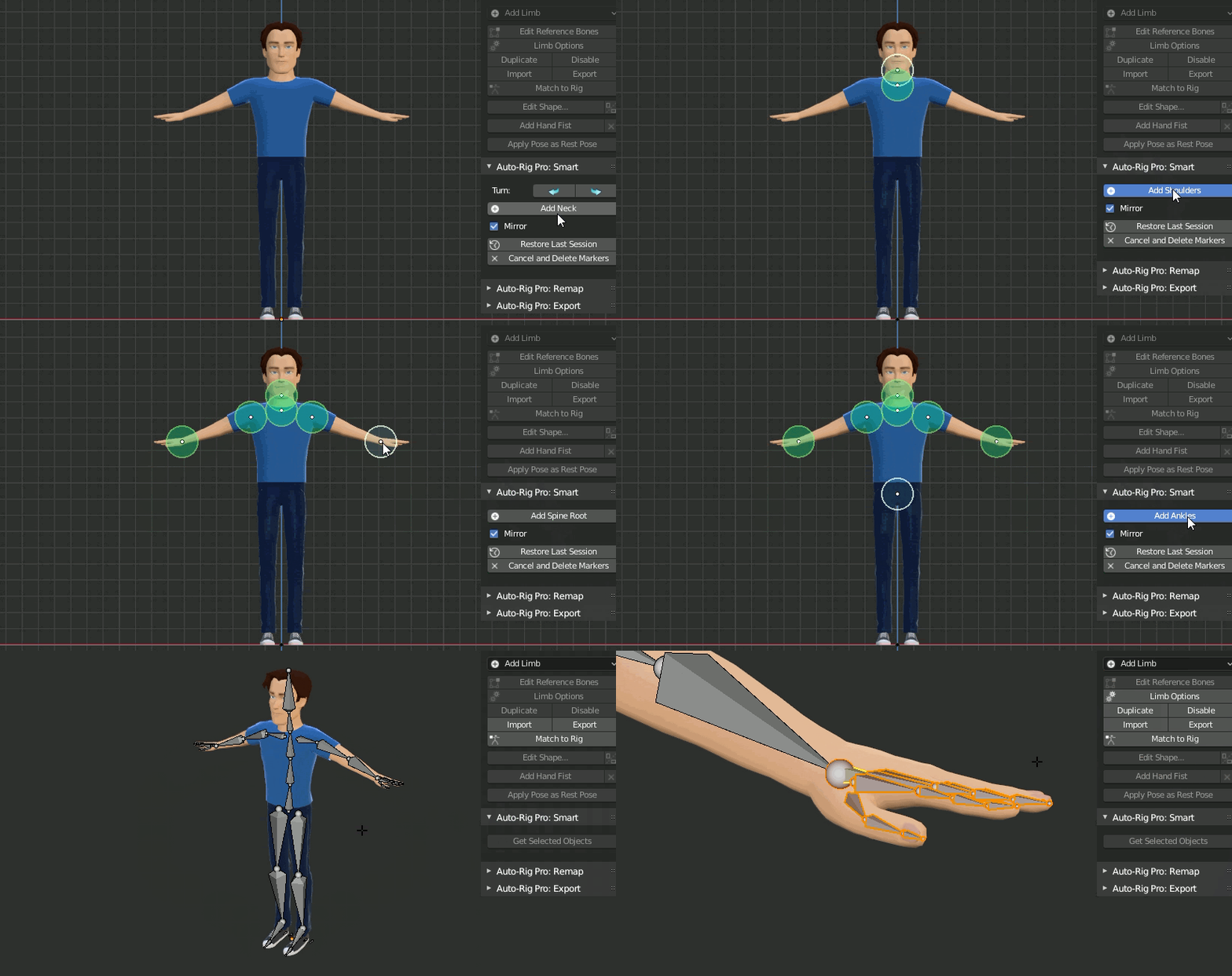
If the character is humanoid, the Smart feature can automatically place the bones to speed up the process, after adding the green markers. The result remains editable.
Non-humanoid characters can also be rigged without the Smart feature, manually (horse, dog...).
Based on a non-destructive workflow, the final rig remains easily editable anytime after its generation. Check the product documentation and the youtube channel for more informations.
The rig system itself is built for performances, allowing fast animation playback.
Character examples: Mike (free), Anna, Kevin, Nina and Alex
Important note about skinning: If possible, use water-tight geometry for best auto-skinning results. Knowing the bases of Blender's skinning tools, weight painting, to fine tweak the bones influences is recommended. Read the doc for more informations.
If you encounter any bugs please report it, be assured you'll receive support/bugfix quickly. Updates are free and will remain free! Also make sure to read the FAQ and the documentation to solve recurrent issues.
Modular - Fully Feature
Customize the rig definition in a few clicks: fingers, wings, toes, spine bones, multiple neck bones, tail, breasts, ears and much more. Duplicate or remove limbs to rig spiders, centaurs... or whatever!
Video tutorial, rig a centaur with the multi-limb feature: Centaur Rig
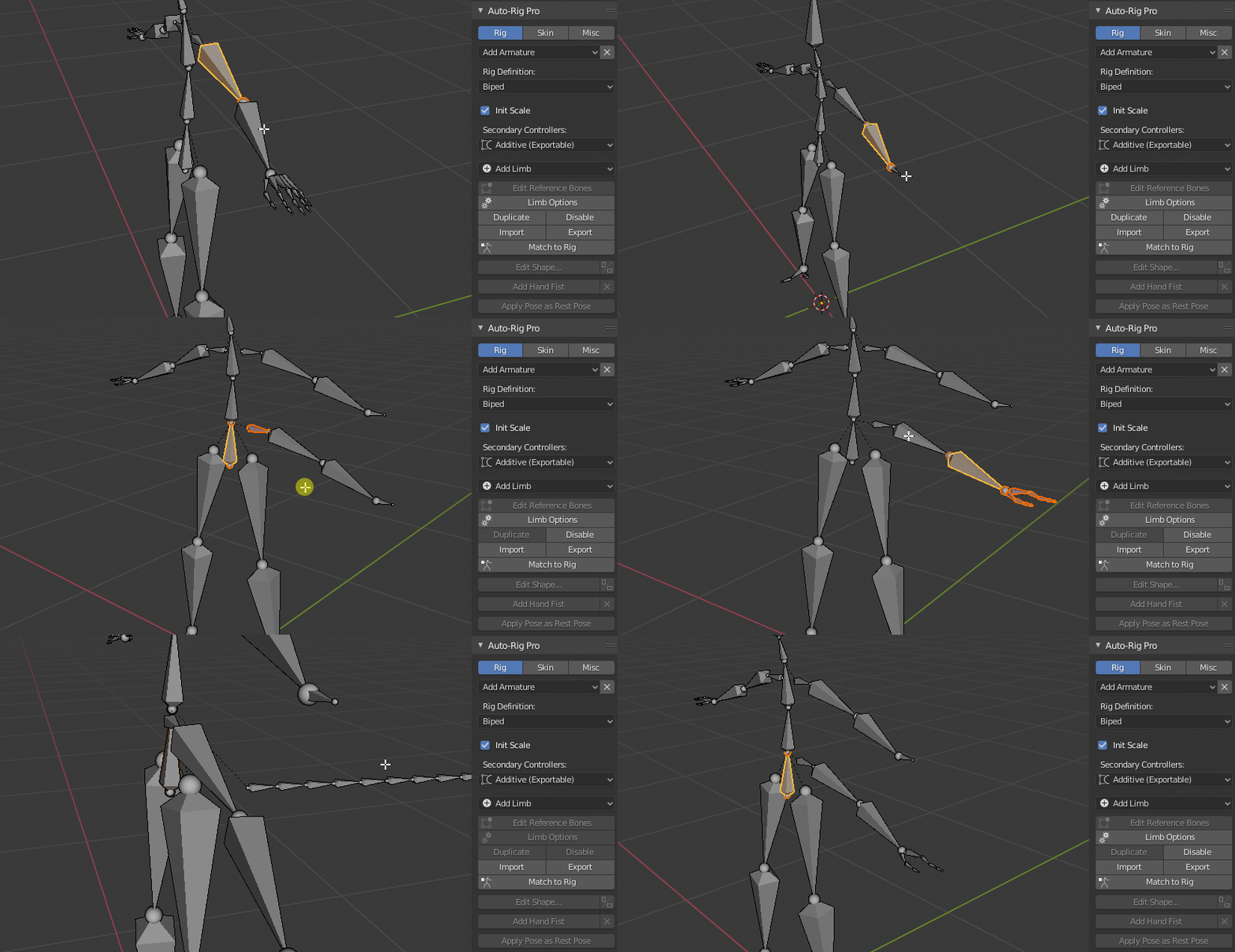
Wings for advanced feathers rig:

Spline IK limb to rig ropes, tentacles, IK spine...

Advanced Spline IK

3 bones IK for quadrupedal creatures:

Fingers IK-FK:

Intuitive tool to edit the bone shapes, with automatic mirror.

Customizable UI: fully editable layout, buttons positions, colors, background pictures...


Remap
The Remap feature allows retargetting of any armature action to another one, with different bone names and bone orientations, supporting imported .bvh/.fbx armatures for example. Define the source armature, the target armature, and the animation will retarget according to the bones names matches and bones original orientation.
It support IK feet, hands for accurate motion tracking, and an interactive offset tool to remap to different characters proportions.
Video: Remapper demo
Additionally, to animate over a motion capture action on an additive layer, check the additive keyer addon (free)!

Game Engine Export
Auto-Rig Pro allows export to FBX format via a dedicated module, to proven engines such as Unity or Unreal Engine.
2 export types: Universal to export the skeleton of any creatures, and Humanoid for bipeds only, with options for easy retargetting and root motion.
- Support of multiple twist bones for optimal volume preservation in game engines, where dual quaternions skinning is not possible (top: single twist bone, below: 4 twist bones)

- Unit conversion to initialize the scale transforms values to 1.0 in Unity and Unreal Engine
- Unreal Mannequin compliant: support Mannequin bones hierarchy, bone axes conversion, bones naming, for UE4/UE5
- Automatic A-Pose
- Support full facial rig, and advanced bones. "Twist" mode for secondary controllers, wrapped on bendy-bones for smooth curves effects, leading to 1:1 export compatibility in Fbx format

- Actions are baked to the simplified rig
- Animated shape keys (blend shapes) support
- Selective/multiple action export
- Root motion support
Bring your poses to the next level!
The Secondary Controllers offer a unique control over the pose. Located all along the limbs, they're dedicated to fine pose sculpting, cartoon effects, bending, stretching, etc. Three deformations mode in option: Twist (exportable to Fbx and bendy-bones based for best compatibility), Additive (exportable to FBX), Bendy-Bones (Blender only).
Just use them instead of corrective shape keys, or as a complement. Below a typical leg bent before and after tweaking the secondary controllers.

Corrective Shape Keys can be created easily with a dedicated tool supporting IK-FK bone chains:

Joints Fans are helper bones in option, allowing correct volume preservation in tricky areas such as elbow, wrist, thigh, knee, even if "Preserve Volume" skinning (Dual Quaternions) is disabled.

ChildOf Constraints Switcher
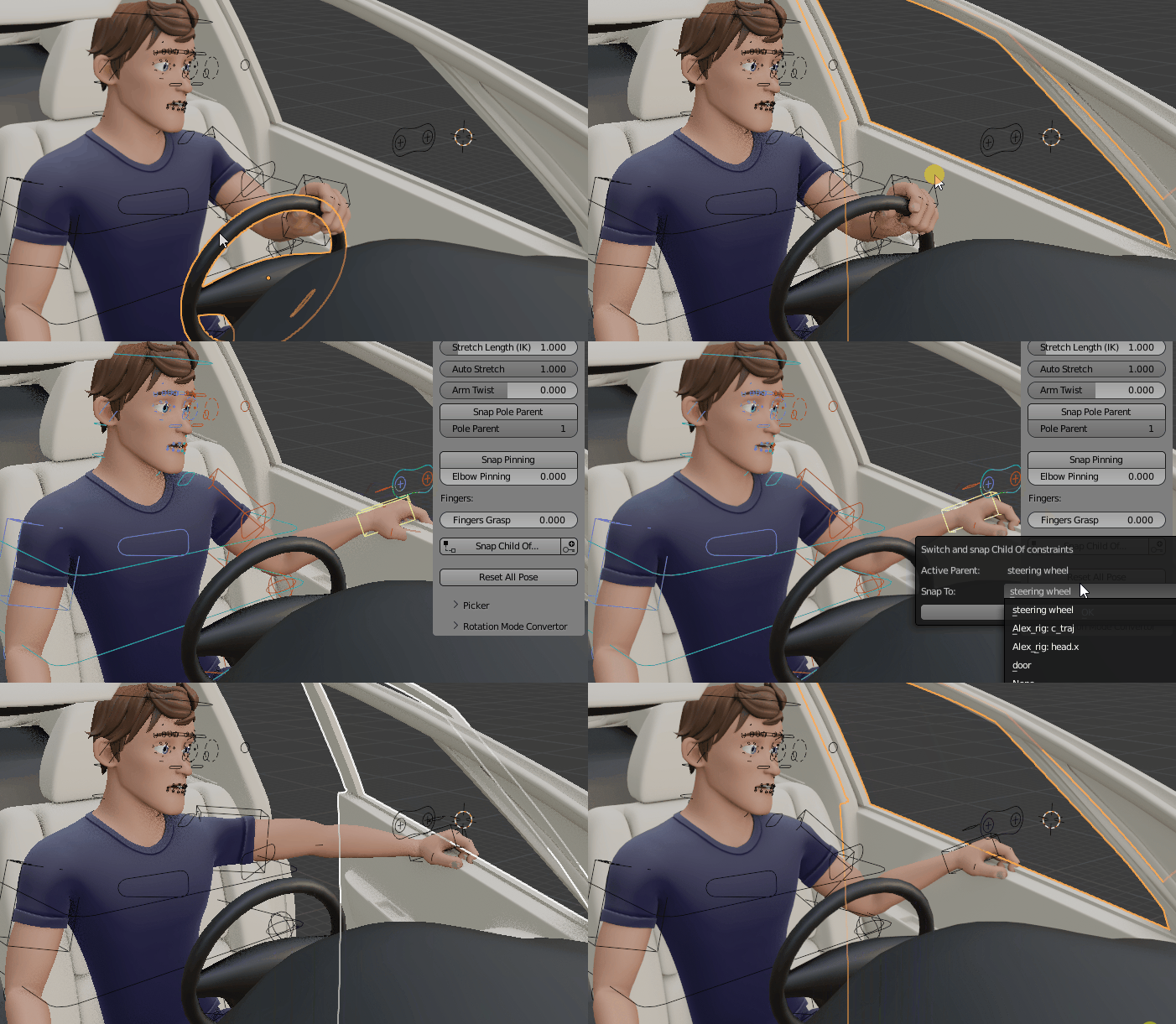
Easily switch and snap from one ChildOf constraint to another with the automatic ChildOf switcher (universal tool, compatible with any rig)
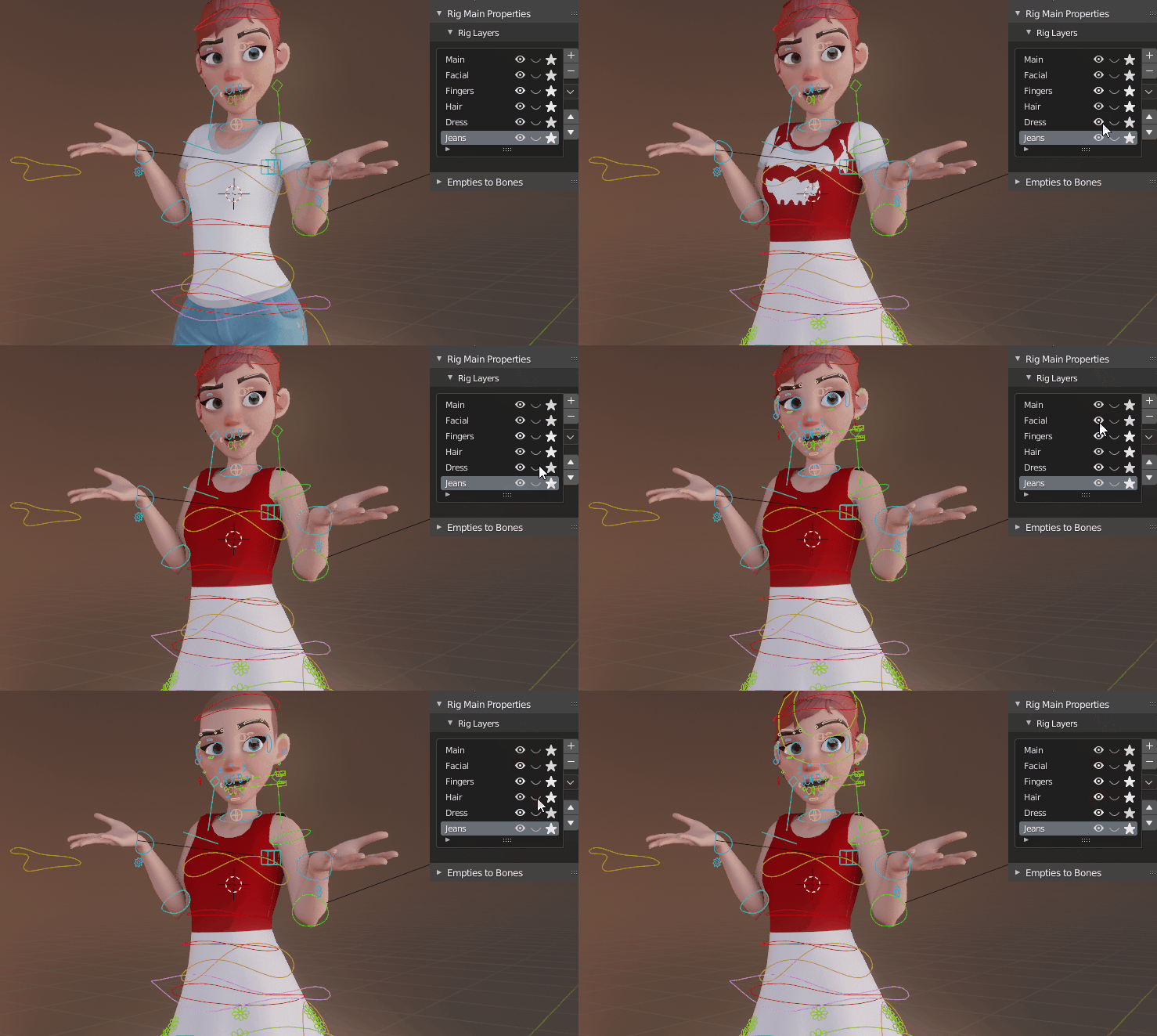
Rig Layers
Store bones, armature layers, objects and collection in custom rig layers to easily manage the character features: hide or show clothes, hair, bones controller...
Built to Last
Blender is constantly improving and updating, and so is Auto-Rig Pro. But even though upgrades are nice, we don't want to miss the old rigs because of compatibility issues with newer versions. That's why backward-compatibility is always ensured at all costs, even if it involves a lot of maintenance on the code side. A legacy menu takes care of preserving features from the past. And if necessary, an "Update" button will upgrade the rigs automatically to the latest requirements, no loss!
Tell Me More!
Extensive list of what's in the box:
-
Automatic bone placement solver based on mesh recognition for bipeds character
-
Edit Reference Bones feature to modify the rig anytime you want. No need to redo everything if a bone is not where you want it to be.
-
Apply Pose as Rest Pose feature to quickly change the rest pose of the character, aligning reference bones on it and applying armature modifiers in a single click
-
Modular: only use what you need. Fingers, toes, ears, breast, adjustable amount of spine, twist bones, tail, and neck bones. Duplicate or remove limbs to rig creatures with multiple arms and legs.
- Fingers auto-rotation option: bend when scaling the first phalange, pre-defined fist pose
- Easy bone shape edition
-
Bone picker: Can be turned on/off, import/export presets. Customizable.
- Colors customization
-
Cartoon compliant: stretchy spine, legs, arms...
- A clear, easy to use and colorful bone picker
-
IK-FK snap with autokey working, and snaps properly when unlocking all the leg/forearm rotation axis
-
IK-FK controllers auto hide
- Hybrid IK pole / IK arrow vector
- Knees and elbows pinning
- Head rotation locked or free
- Bend all fingers in one click (fingers grasp), fist pre-defined pose, auto rotation of fingers phalanges from scale
- IK/FK eyes
- Auto-eyelid rotation
-
Multiple Child-Of constraints support for the IK hands and feet to change their parent space any time (e.g. if the character is driving a car, hands on the wheel, then grab the car door)
- Complete set of secondary controllers for fine pose sculpt
- Advanced facial setup with automated placement
- Shape keys drivers creation tool
-
Game engines support: Unity - Unreal Engine FBX Generic and Humanoid rig type
-
Bone remapper to retarget any armature action to another one, with different bone names and bone orientations. Bvh/Fbx files compliant - Mixamo animations, with IK support
- Compliant with X-Muscle System for realistic muscles simulation
- By buying this addon you support my work and the Blender foundation, its developers financially. A part of each sale is donated to them. It's worth a big thank you from the open source community, helping Blender remaining free and accessible for everyone! And obviously you ensure the funds for this addon next new features, bugfix. I'm making my best to constantly improve the beast, based on users requests and my own ideas. Have quick look at the release log below. You receive a notification when the addon is updated, and download it for free.
Users Cases:
Auto-Rig Pro is actively used in the film and video-game industry.
Games:
Eternight
Fabledom
Manor Lords
Usurpator
Trail of Nanook
Escape Legacy: Ancient Scrolls
TV Series:
CoopTroop
Magic Campers
Gus
Team Dronix
Pachyderme
Updates:
Make sure to uninstall the current add-on before installing the new one and restart blender
--[3.69.45]--
New/improved:
- Version: Upgraded the whole code base to Blender 4.0, with armature collections support. Make sure to click "Update Armature" when opening rigs from older versions.
- Version: Because Blender 4 removed the extra frame added at the end of actions frame range, added a new Legacy setting to back up this additional frame
- Version: Blender 4 does not handle properly the double IK fingers constraints, leads to cyclic dependency (wobbly bones effect). Then, unfortunately the second IK at the tip of the fingers had to be removed. Click "Update Armature" when opening old rigs with IK fingers. Note, this second IK constraint could be restored later, will require more advanced bones mechanics to avoid the cyclic dependency.
- Interface: New "?" button in the Limb Option panel, that opens the documentation page (internet) of the selected limb when clicked.
- Interface: Renamed the UI panel "Bone Custom Props" to "Bone Properties"
- Export: New Presets feature, to save and load export settings quickly
- Export: FBX: Expose the "Force Start/End Keyframe"
- Export: Clean up of the humanoid UE skeleton collections
- Export: The Fbx and Gltf export operators were renamed, leading to change the script snippets in the documentation. Old name: "id.arp_export_fbx_panel", New: "arp.arp_export_fbx_panel"
- Export: FBX: Exposed the Vertex Color space setting
- Export: Mesh to mesh parenting is now preserved when exporting, and non-skinned children meshes parented to skinned meshes are exported as well
- Export: Bones animations can now be exported with constant keyframe interpolation, using the "Set Const. Bones" button. Applies to all keyframes, all actions of given bones. Todo later: fine-tuning, in order to export only specific keyframes as constant.
- Export: Added effective export time in the popup notification after export
- Export: Humanoid export now supports more than 2 arms and feathers
- Export: Menu to remove export presets (X button next to +)
- Rig: The selected armature can now be saved as a custom preset automatically (it was already possible to add custom presets before, but the preset files had to created and put in the folder manually)
- Rig: The custom presets armatures can be removed using a dedicated menu
- Rig: Facial options: Slight change in the behavior of "Update Transforms" for eyelids. Now, eyelid bones are aligned automatically in a circular shape only if the amount was changed and this setting is turned on. Before, they were always aligned if the amount was changed, regardless of this setting.
- Rig: Spline IK: New FK mode (Limb Options). Generate master FK controllers every Nth bones, by default locked to the IK masters amount for correct IK-FK snap.
- Rig: Spline IK: IK-FK switch and snap (Rig Main Properties). IK to FK snapping is accurate, but FK to IK is not by nature: compensating the smooth curve interpolation between control points is quite a technical challenge, to improve later if possible.
- Rig: Spline IK: New "Update Vertex Groups Name" setting (Limb Options). If enabled, automatically renames the vertex groups of the deformed meshes, according to the latest changes in Spline IK Limb Options.
- Rig: Armature Presets: Custom armature presets can now be stored in an external folder, as set in the addon preferences. Armature libraries can be added into this external folder, making it independent from the addon installation folder (custom armatures will not be deleted anymore when updating the addon). Custom presets files stored in the addon folder still remain.
- Rig: Blink Pose: When removing the blink pose, a menu now prompts to remove the whole blink pose, or only in-between poses
- Rig: New "Joints Fans" bones, for optimal volume preservation of elbows, wrists and thigh and knees. Useful when exporting, if skinning's Preserve Volume is disabled. From 0 to 32 bones can be set in Limb Options.
- Rig: The "Reset All Pose" button is now displayed even if no bones are selected
- Rig: New Toes Metatarsal bones (Limb Options), can be parented to foot instead of the main toe bone.
- Rig: New Toes IK-FK (Limb Options). IK-FK switch and snap, IK Direction inversion, for all or selected fingers. Automatic renaming of vertex groups when enabling/disabling IK-FK bones in Limb Options.
- Rig: New IK hand offset controller (Limb Options)
Fixed:
- Export: Error when actions contained a single frame only
- Export: Scene Units set to None was crashing the export
- Export: Actions with no "id_root" attributes were not exported
- Export: Wrong mannequin bones axes orientation, because of hidden bones collections
- Export: Shape keys animation as an NLA track did not export with "Apply Modifiers" setting enabled
- Export: Error when exporting IK Splines with Blender 4
- Export: Crash when no deforming bones are selected, while "Only Selected Bones" is enabled
- Export: The "Set Universal Rig" function was missing custom script execution
- Export: The Set/Unset export rig function could remove vertex groups when unsetting, if the vertex groups were not assigned to any vertices
- Export: "Export Root Bone (c_traj)" was not working in Universal type
- Export: Fbx export crashing when exporting UVs with non zeroed out mapping rotation
- Export: Metacarpal finger bones were always exported even if "Selected Bones Only" was enabled
- Export: Error when exporting a custom armature with a bone named "root.x"
- Remap: Fixed unreported bug with collection visibility
- Version: "Show IK Direction" line broken in Blender 4
- Version: "Update Armature" was not removing the second IK fingers constraint when the rig was already updated to Blender 4
- Version: Move constraints operator broken in Blender 4, use lower level functions instead
- Version: Some users report error when importing the Requests module (chardet import error), use urllib instead
- Rig: Ensure bones custom shapes are assigned to the cs collection and parented to cs_grp
- Rig Layers: Error (in console) when updating layers visibility while nothing is selected
- Rig: Disable fingers Rot From Scale broken in Blender 4
- Rig: Control and reference lips bones had incorrect colors in Edit mode
- Rig: Error with Kilt limbs and single colliding leg
- Rig: The Kilt custom shapes were removed when editing more than one Kilt limb
- Rig: The Kilt custom shapes were removed when editing more than one Kilt limb
- Rig: New eyelid bones had no color
- Rig: Legs IK poles roll was not aligned when Match to Rig. Added a Legacy setting for backward-compatibility
- Rig: In Secondary Controller:Twist mode, the forearm twist bone was missing an offset bone, leading to scale the transforms.
- Rig: Edit Shape: Editing the bone custom shape now supports the additional transforms settings available in Blender 3 and above
- Rig: Fix Bendy-Bones limb alignment throwing an error because incorrect bone side was evaluated
- Rig: Incorrect fingers rotations when adding rig fist
- Rig: Error when setting the leg IK offset
- Smart: Error when removing an optional facial object from the detection
- Smart: Error if facial objects are not assigned to any view layers
- Smart: Removed any dead BGL call for MacOS compatibility
- Skin: Bind crashing when an eye object was defined in Facial Features, but no eye bones found
- CheckForUpdate: urllib request module import broken in latest python versions
- Installation: Armature presets path crashing the addon install if the path does not exist yet
> Older Release Logs