作品リンク
今回は最小限の原画で「動きと変化」を表すレトロゲーム風演出技法を解説。
動きを再現しつつ、通常時と変化後の差を繋ぐ動かし方を見ていきます。
In this column, we’ll explore retro-style animation techniques that express motion and transformation using a minimal number of keyframes.
We'll look at how to recreate movement while smoothly connecting the differences between the character's normal and transformed states.
1.ベース(Base) 立ち絵・変化前後
2.変化(Transformation) 中割追加
3.演出(Animation Effects) 溜め・止め フリッカー
4.アニメ一例(Example)
ZIP内Textに製作者様サイト・Trial Versionダウンロードリンクを記載。
The creator's site, Trial Version DownLoad Link, is written in the ZIP Text.
= = = =
※テンプレートによる再現等は自己責任かつ権利侵害等のない範囲で行う事。
*If you use a template to create content, please do so at your own risk and within the limits of not infringing any rights.
= = = =
ご意見・ご要望があればお気軽にコメントやメッセージをお送りください。
Your feedback or suggestions—feel free to reach out via comments or messages.
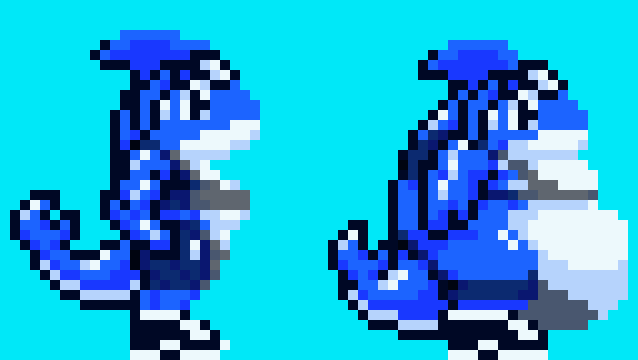
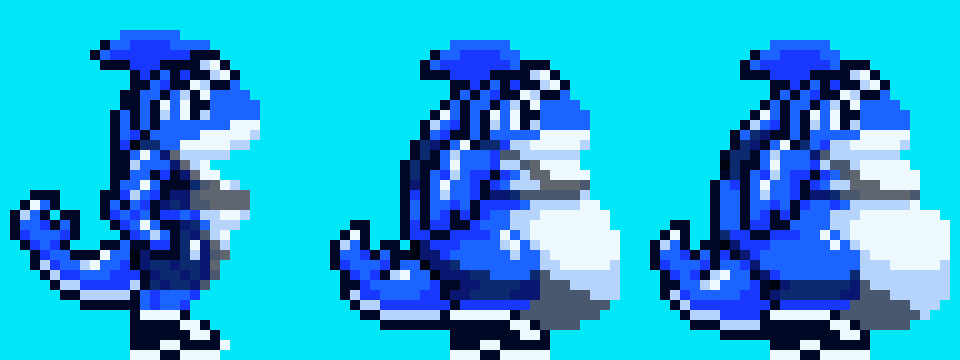
まずは「変化前後の立ち絵」の2枚を用意し、
位置や差を確認して前後を無理なく繋げられるかを見ます。
描写内容は変化のギャップは出しつつも「全く別物」にならないようにし、
視線を誘導したい箇所(例:腹部・胸・腕)を意識して変化をつけます。
First, prepare two character sprites — one before the transformation and one after.
Check their positioning and differences to ensure the transition between them feels natural.
When designing the visuals, aim to show a noticeable change without making the two look like completely different characters.
Make sure to emphasize the areas where you want to guide the viewer's attention — such as the belly, chest, or arms.
変化前後二枚の原画へ間を埋める「中割」を追加し3コマ構成にします。
今回の内容では終わり側の絵を少しずらして顔・上半身の変化は少なめにし、腹部〜下半身にかけて「広がる動き」「重み」を意識させる繋ぎ方です。
腕や周囲のパーツも、圧迫されるような「押し広げ」を加えるとより良き。
Add an intermediate frame between the two key poses to create a three-frame sequence.
In this example, a slight shift in the last frame reduces change to the face and upper body, while emphasizing the movement and weight that spreads from the abdomen to the lower body.
For further effect, try adjusting the arms and surrounding features to simulate a feeling of being 'pushed outwards', as if they're compressed or expanded by the transformation.
変化する様をそのままつなげると動きの流れを見れる一方、コマ数が少ないと
表示が速すぎたり変化を意識しづらく繋がりが認識できにくいです。
そこで有効なのが "溜め、止め・フリッカー" の演出テクニックです。
Simply playing the transformation frames in order can show the motion, but when the frame count is low, the animation may appear too fast, making it hard to perceive the change or feel the connection between frames.
To address this, using techniques like "anticipation, pause, and flicker effects" can help enhance clarity and add impact to the transformation.
最小限の原画枚数で表せるアニメーションにおける演出手段として
表示時間で間を作る溜め・止めと前後の繰り返しによるフリッカー表現
を使った強調演出で印象を高める内容となります。
When working with a minimal number of keyframes, you can enhance the impact of the animation by using techniques — such as adding pauses (hold and anticipation) and flicker effects by rapidly alternating between frames — to emphasize the transformation and make it more visually striking.
ここまでが変化のアニメーション作成までの最小限の範囲かつ基礎となり、
他の動きと組み合わせ繋げていくと演出や表現に幅を持たせられます。
What we've covered so far represents the foundational process for creating a transformation animation using the minimum number of keyframes.
By combining it with other motions or effects, you can greatly expand the range and richness of your animation's expression.
溜め・止め寄り(Hold- and anticipation-focused approach)
変化前や後のコマの表示時間を長くして「溜め」や「余韻」を演出。
原画が最小限の2枚でも表せ、カメラのズームや静止などの補間演出も可能。
By extending the display time of the frames before and after the transformation, you can create a sense of anticipation or aftereffect.
Even with just two keyframes, this method can effectively convey motion, especially when combined with camera zooms or still-frame transitions to smooth out the sequence.
溜め・止め+フリッカー(Hold + Flicker Technique)
変化前後のコマに溜め・止めを行い、フリッカー演出で「変化中」を強調。
メリハリを加えて動きに意識を向ける表現。動かし方で個性が出やすい。
By applying hold and anticipation to the frames before and after the transformation, then using a flicker effect between them, you can emphasize the “moment of change” more clearly.
This adds rhythm and contrast to the animation, naturally drawing the viewer’s attention to the movement.
Since the timing and motion style can vary, this method also allows for strong creative expression and individuality.
フリッカー寄り(Flicker-Focused Approach)
変化前後を高速で交互表示して「揺らぎ」や「強調」を追加。
激しい動きや瞬間的変化の演出で勢いを表せ、余韻は抑えめになる。
By rapidly alternating between the pre- and post-transformation frames, you can add a sense of vibration or emphasis to the animation.
This technique is especially effective for conveying sudden, intense changes or movement.
However, it tends to minimize any lingering aftereffects or subtle transitions.
今回は最小限の原画から変化アニメーション演出を行う解説をしました。
コマ数を増やして溜め・止めを繰り返していくと際限なく強調は可能ながら
原画の枚数や内容次第ではズレや違和感が出るので万能ではないです。
滑らかさや内容の変化に表現を求める場合は原画枚数を増やす必要が出ます。
In this column, we’ve explained how to create a transformation animation using a minimal number of keyframes.
While increasing the number of frames and repeating holds and pauses can allow for limitless emphasis, it’s important to note that depending on the number and quality of the keyframes, misalignments or awkwardness can occur.
If you want smoother motion or more nuanced changes, you’ll need to increase the number of keyframes.
今回はここまでです。
最後までお付き合いありがとうございました。
Thank you for reading to the end.
ご意見・ご要望があればお気軽にコメントやメッセージをお送りください。
your feedback or suggestions—feel free to reach out via comments or messages.
chuckman1288
2025-04-15 06:37:18 +0000 UTCCounter
2025-04-13 09:00:06 +0000 UTC