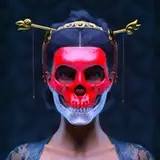
In preparation for the upcoming MET Gala, Hensley Atelier presents the Bespoke Collection. With a heavy focus on tailoring, extravagance, and structure, the collection is made up of nine looks, all of which come in fifteen distinct swatches. The collection will be presented in black, white, gray and yellow, however included with each garment is a plethora of plaids, tweeds, solids, and even our brand new Hensley Atelier Monogram Logo Print!
These items are BLENDER ONLY. They will not work in your Sims games. To use them simply append them into the scene where you have your nude sim, then sculpt the garment to better fit your sims body. I normally select the elastic deform tool and make sure the X axis symmetry is turned on. The last step is to assign your sims rig and you are good to go.
ALL LOOKS have multiple swatches. You can change them by simply dragging the desired color from the Node Group Node to and attaching it to the Base Color on the Principal BDSF.
 Unfortunately not only is creating these textures incredibly time consuming (adding between three to four hours onto making each look), it also makes the files quite heavy. So don’t freak out when you see that a simple garment is a very large file size. If you need to delete the texture you are not using I recommend doing so.
The Tights are made with a SHRINKWRAP Modifier. Minimal sculpting is required, you just need to line up the bottom of the tights with the bottom of your sims foot, the crotch area and butt. From there go to the modifiers tab and assign the Shrinkwrap to your rig as you would the clothing. It should form around your Sim's legs. IT IS IMPORTANT TO THEN APPLY THE MODIFIER! If you do not apply the modifier the tights will snap to other parts of the body while posing. Minimal sculpting adjustments may be required after applying the Modifier. 
I highly recommend deleting all parts of your sims body mesh that are covered by the clothing. This will prevent clipping and lower the polygon count, which will hopefully speed up render times. ESPECIALLY for the Gloves and Boots, as well as the Tights.
These garments are very high poly, it’s the only way to give you the quality you deserve. I recommend working in Solid View and Hiding Particles while placing your sim in blender. This helps reduce lag in the 3D window. That being said, depending on your computer specs they should Render reasonably quickly.
I hope you enjoy and don’t forget to tag @hensley.atelier so we can see your photos and share your work!!
https://www.mediafire.com/file_premium/j4bsfs8aek37gas/Collection_25.zip/file