Construction Lines - Accurate Cad Modelling Add-On For Blender
Added 2024-07-29 21:15:42 +0000 UTC
Construction Lines Version 0.9.691
CAD Modelling for Blender
Installation & Tutorial Video here
Overview And Key Functions
Construction Lines is a tool for accurate CAD style modelling. Build snappable guide points and edges, draw lines and primitive shapes in place, automatically create faces in closed geometry, precisely move, duplicate and rotate geometry around a scene and cut-through meshes with extrude.
Guide edges and points allow for a construction workflow where guides are set and models are then constructed within these guides. The guides won't interfere with model geometry and can be toggled off and on when required. Guide edges will disappear when working outside of Construction Lines and neither Guide Edges nor Guide Points will be rendered.
Construction Lines allows for rectangles, circles, and arcs to be drawn in place from precise snap points on existing geometry or guides. These can be drawn from anywhere on a 3D model without the need for Blender's 3D cursor to define an Add location. Drawing shapes onto existing faces will automatically cut into the existing face.
Construction Lines works seamlessly between Object and Edit modes in Blender.
Installation & Tutorial Video here
Full Documentation and Installation Instructions here
FAQs here
If you come from software packages such as SketchUp this is a perfect way to get started with Blender
NOTE: Construction Lines is currently in Beta and is regularly updated with fixes and improvements. Please also note that Construction Lines is not intended for use on very dense meshes.
Price Reduced in Beta
Blender Products Supported: 2.93 - 4.2
ACCLAIM
"A big thank you for all your effort in creating this sophisticated beautiful add-on"
"Coming from a CAD and 3DSMAx background - this adds alignment and geometry-based snaps missing for so long in Blender. This little tool is saving me a lot of time."
"Your add-on Construction Lines is becoming a saviour and a game-changer for many SketchUp users"
"Just a must-have, very good!"
FEATURES
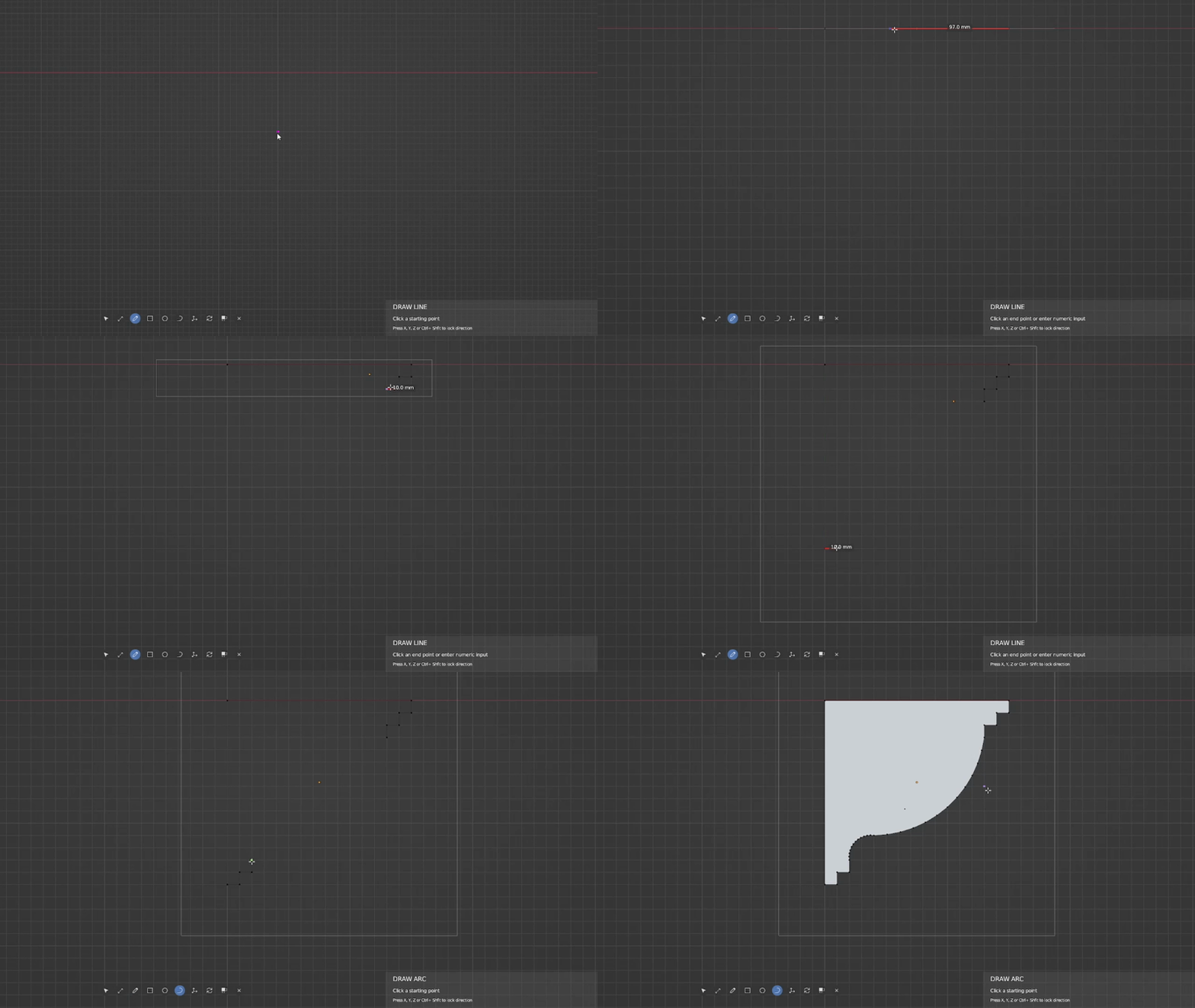
Line Drawing With Grid Snapping
Duplication & Box Selection


Rotation

Extrude & Cut-Through

Cut into existing faces

Guide Edges & Points


Drawing Lines

Drawing Shapes In Place


Precise Object Moving

Feature List
- Create snappable guide edges and points
- Precisely measure distances
- Build rectangles, circles and arcs anywhere in your scene
- Draw lines simply by clicking and dragging in the 3D viewport
- Lines will automatically fill in faces where geometry is closed
- Use lines or shapes to cut into or divide existing geometry
- Build lines, shapes and guides to exact size with numeric input (including mathematical operators * / + -)
- Limit drawing and movement to the X, Y or Z axes
- Auto snap to Perpendicular edge direction and edge extensions
- Accurate object movement with snap points or numeric input
- Cut into existing geometry by drawing onto existing faces (Construction Lines will automatically create the extra required geometry), allowing shapes to be extruded in and out of existing meshes.
- Extrude and cut-through meshes, object rotations, horizontal guides and direction locks.
- Grid snapping
- Automatic duplication and arrays of objects and geometry (now includes automatic object linking)
- Box selection
- Edit mode move and delete
- Persistent dimensions on guides
RELEASE NOTES
Version 0.9.691
Released: 19/04/2024
Release Notes:
New Features & Bug Fixes:
- Fix: Extrude occasionally cuts through volumes incorrectly, removing extra back faces
- Fix: Extruding a plane doesn’t correctly build a volume, depending on the direction of the face normal
- Fix: Other bug fixes and improvements related to the Extrude tool
- Fix: Drawing multiple faces onto an existing face would sometimes not split the existing face leaving a floating/un-attached face
- Improvement: Imperial measurement display now uses the precision value in the Tool panel. The precision values will be calculated as powers of 2. The default is precision 4 which will be 16ths (2^4). The maximum value of 6 will be 64ths (2^6)
Version 0.9.69
Released: 26/01/2024
Release Notes:
New Features & Bug Fixes:
- Fix: Extrude issue on edges - Better handling
- Fix: Extrude preview showing incorrectly when the working object is rotated - extrude happens correctly but the preview box seems to be using global space face normal rather than local space
- Fix: Extrude issue when passing through multiple faces in a single extrude
- Fix: When duplicating an object need to add it to the same collection as the original object
- Fix: Select box and Extrude tools now allow for input release over any UI within the viewport without cancelling the tool
- Fix: Issue in face-finding where there’s an open face in a volume that’s connected to another face - face not found when drawing line/primitive along/around opening
- Fix: Input region issues when regions are resized\split and input is no longer registered inside the region
Version 0.9.68
Released: 22/11/2023
Release Notes:
New Features & Bug Fixes:
- Updated: Support for Blender 4.0 and is backwards compatible with Blender 3.x versions
- Updated: Re-wrote GPU shaders so that Blender 4.0 changes are supported and Mac Metal users can now use dashed lines on guides (without the need for switching to OpenGL or setting guides to solid lines). This is backwards compatible with support Blender versions
- Feature: There is now an option to disable face finding when editing an object. This option is in the Tool panel
- Improvement: The face-finding algorithm is now much faster when drawing across multiple, separate, faces in the same mesh
- Improvement: Edit Mode indicator bounding box will no longer display on a single edge that runs along an axis (x, y, z). Previously the bounding box would obscure the edge.
- Improvement: When editing meshes, recalculating the face normals is now more accurate, leading to fewer instances of faces pointing in the incorrect direction
- Fix: Issues with undoing actions and the object origins resetting incorrectly causing the object to change location. Origins are no longer changed when editing an object and Edit Mode bounding boxes have been re-written
- Fix: No distance indicator when moving objects
- Fix: Drawing a shape immediately after building a guide leads to “‘NoneType’ object has no attribute ‘update’” exception and crash
- Fix: Bug in rectangle drawing causing input not to respond to “Override Unit Scale” preference
Version 0.9.67
Released: 06/07/2023
Release Notes:
New Features & Bug Fixes:
- Fixed: Issue with extruding from a newly drawn plane - face normals were not re-calculated correctly leading to issues when trying to extrude into the newly extruded volume.
- Fixed: Error thrown when drawing a shape on top of an existing object (not in Edit mode) and then trying to extrude the new shape’s face. Hovering over the object to find the face to extrude would throw an error
Version 0.9.66
Released: 30/06/2023
Release Notes:
New Features & Bug Fixes:
- New: Construction Lines is now compatible with Blender 3.5 so newer Apple Macs running Metal won't have to switch to OpenGL rendering
- New: Complete rewrite of extrude functionality so that Blender's Boolean modifier is no longer solely relied on. This fixes many of the previous versions' stability issues NB: There is an option in the Tools panel (press ‘N’) to control whether to use Booleans for mesh cut-through. Using Boolean cut-throughs allows for multiple mesh wall cuts but in some instances is not as stable as the new cut-through, which does not use Booleans. Cutting through without using Booleans cuts through a single mesh wall at a time
- New: Use object move+Alt to duplicate and link object. When objects are linked, changing one will change all of them. Using move+Ctrl will duplicate the object (without linking) as before. Preferences for the Ctrl and Alt modifiers are both in the preferences.
- Improved: Face-finding and face-splitting algorithms have been rewritten for reliability and stability
- Improved: Imperial display for measurements now only use powers of 2 for inch fractions and will revert to closest 64th when no exact fraction match is found
- Improved: The colour of extrude outline now changes to show that it will cause a cut-through in the mesh
- Improved: Mesh snapping performance on more dense meshes
- Improved: If CL crashes it will log an error to the console and exit cleanly so that it can be rerun without restarting Blender first
- Fix: Undo would sometimes cause the object's origin and location to change
- Fix: Take into account Unit Scale settings when snapping to the grid
- Fix: CL objects are now added to the current scene correctly when working with multiple scenes
- Fix: Extrude outline is sometimes not complete
- Fix: Hover face outline is sometimes not complete
- Fix: Sometimes when exiting CL in Object mode it would still be running in edit mode
- Fix: Snapping to vertices will now always take precedence over directional snaps (not direction locks)
- Fix: When drawing a rectangle on a face with an angled edge (triangle for instance) the rectangle orientation is incorrect
- Fix: When moving geometry and then pressing 'X' to lock to the X-axis, sometimes the geometry is removed
- Fix: The option to rotate geometry in edit mode has been disabled until that functionality has been implemented
- Lot's of other minor bug fixes and improvements
Known Issues: Seems to be a conflict with the Kit Ops 3rd Party add-on. Construction Lines is very slow if this is running. I'm in contact with the developer to see if we can resolve this between us. The workaround at the moment is to disable Kit Ops in Edit→Preferences.
Version 0.9.65
Released: 23/09/2022
Release Notes:
New Features & Bug Fixes:
- Fixed: Pressing Enter to begin numeric input not working correctly for Numpad
- Fixed: Errors when switching contexts
- Updated: Support for Blender 3.3 LTS
Version 0.9.64
Released: 29/07/2022
Release Notes:
New Features & Bug Fixes:
- New: Most Blender shortcuts can now be passed through to Blender so that pie menus, viewport shading, add new object, etc. can now all be used whilst Construction Lines is running
- New: Alternative navigation inputs are now supported - Industry Compatible input, etc.
- New: Added new keymap preferences to support the above pass-throughs
- New: Imperial display precision and unit separation preferences
- Improvements: Improvement to Imperial unit input and display, including better formatting and precision. Also responds to Adaptive units
- Improvements: Scale dashed lines with zoom to keep dash sizes and gaps similar at any zoom level - especially useful when zooming in to small scale
- Fix: Snapping to objects in local view would continue to snap to non-visible objects
- Fix: Drawing a line on the surface of a linked object (multi-user object) - throws error: "Cannot apply to a multi-user: Object"
- Fix: Grid snapping when using imperial - Note that major grid points are always in feet at 1.0 scale so for inches in minor grid points use 12 subdivisions
- Fix: 0.1-inch input was outputting geom measuring 98.4mil, not 100mil (0.025 Blender units instead of the correct 0.0254). Internal precision is now 6dp
- Fix: Bug in rectangle input - inputting values when a rectangle has not been dragged out or is dragged in a straight line would throw an error
- Fix: Bug when using '*' or '/' in numeric input when multiplying or dividing the current drag distance
- Fix: Toolbar colour preferences were previously not displaying correctly on white/light themes
- Platform: Updated drawing code for Vulkan and Metal support (as per Blender API recommendations)
Version 0.9.63
Released: 08/04/2022
Release Notes:
New Features & Bug Fixes:
- New: Grid snapping (version 1)
- Improved: Performance when selecting visible geometry - now uses selection flags so turning off will reduce geometry stored not just geometry checked for closest
- Improved: Performance when object has modifiers. Modifiers are now automatically turned off in Edit Mode when CL begins and are restored on exit
- Fixed: Issue with high-poly objects at some viewport angles, the objects behind were being snapped to even when obscured by closer objects
- Fixed: Expression input where parsing failed eg."5-0.2" to achieve an input of 4.8 would previously fail
- Fixed: Polling error when area is None Type ("None Type has no member Type")
- Fixed: When drawing shapes with line tool geometry origin is now correctly set after each step
- Fixed: Issue with extrude object not being deleted correctly on undo
- Fixed: Allow guide point scale to increase above 1.0 (high-resolution displays)
- Fixed: Messaging in tips box "Ctrl to multi-select" now reads "Shift to multi-select"
Version 0.9.62
Release Notes:
New Features & Bug Fixes:
- New: Grid snapping (version 1)
- Improved: Performance when selecting visible geometry - now uses selection flags so turning off will reduce geometry stored not just geometry checked for closest
- Improved: Performance when object has modifiers. Modifiers are now automatically turned off in Edit Mode when CL begins and are restored on exit
- Fixed: Issue with high-poly objects at some viewport angles, the objects behind were being snapped to even when obscured by closer objects
- Fixed: Expression input where parsing failed eg."5-0.2" to achieve an input of 4.8 would previously fail
- Fixed: Polling error when area is None Type ("None Type has no member Type")
- Fixed: When drawing shapes with line tool geometry origin is now correctly set after each step
- Fixed: Issue with extrude object not being deleted correctly on undo
- Fixed: Allow guide point scale to increase above 1.0 (high-resolution displays)
- Fixed: Messaging in tips box "Ctrl to multi-select" now reads "Shift to multi-select"
Version 0.9.61
Release Notes:
New Features & Bug Fixes:
- New: Added snapping to guide/edge intersections
- New: Alt+'X' will dissolve geometry to complement normal 'X' for remove
- New: Alt+'Z' toggles wireframe/solid views
- New: Font size is now in preferences and will affect the size of guide dimensions and tips box text
- Change: Guides will now automatically enter horizontal mode if dragged from another guide
- Fixed: 'Error: Viewlayer does not contain object' crash when exiting CL and trying to restore a hidden object
- Fixed: Removed persistent dimension text from horizontal guides
- Fixed: If an object was hidden during CL use, the object faces could still be snapped
- Fixed: If toggling to Object mode when in Extrude, tool would stay on Extrude. Now changes back to default Select tool
- Fixed: Improvements to face finding and edge splitting when adding new geometry to existing
- Fixed: Bug with undo after an extrude operation. Working object would lose focus and sometimes extrude boolean object would be rebuilt
Version 0.9.6
Release Notes:
New Features & Bug Fixes:
- New: Interface Updates - Dimensions and tips are no longer shown in the top bar, instead dimensions are shown whilst drawing/measuring and tips are shown in a new text box.
- New: Shapes and guides are now drawn with dynamic dimensions attached to them that update whilst they are being drawn.
- New: Guide dimensions are now persistent, so will remain on the guide after drawing
- New: Tools panel section ('N' panel in Blender) with shortcut guide, snapping options, quick access to measurement units and options to display tooltips box and guide dimensions (persistent)
- New: Objects and geometry can now be deleted from within Construction Lines. Simply select the object or Edit mode geometry to be removed and press 'X'
- New: Edit mode geometry (verts, edges and faces) can now be selected, moved, duplicated (see below) and deleted from within Construction Lines
- New: Object and geometry selection box. When in select mode, click and drag and a selection box will be drawn. Dragging from left to right will select any object or geometry completely within the selection box and dragging from right to left will select anything within the selection box or that that selection box is touching
- New: Object and geometry duplication. Select geometry or an object and using the move tool, begin to move. Press Ctrl and the object/geometry will be automatically duplicated. Click to place and then type a number and hit Enter. This will produce multiple duplications based on the number that has been entered, with the same spacing and direction as the original duplicate. Typing '/' before the numeric input will distribute objects between the original object and the duplicate.
- New: Guides can also be moved and duplicated
- New: visual indication when in Edit mode. A bounding box is now drawn around and offset from the geometry to show that the current mode is Edit
- New: Ability to double click an object to enter Edit mode on the object. Click away from the object's geometry will toggle back to Object mode
- New: No longer need to press Enter to begin numeric input if using the number row and the Numpad can still be used for navigation. The option to use the previous Enter method is in preferences.
- New: Preferences have been re-designed with collapsible sections and now include preferences for all colours and shortcut keys
- New: Snap point size can now be set in preferences
- New: Guides are now context-aware so will default to horizontal guide if dragging from an edge
- New: Right-clicking the mouse will now cancel the current tool
- New: Re-do action can now be called with Shift+Ctrl+Z
- New: Guide point names have now simply been changed to _CL_POINT
- New: Locking to arbitrary direction is now Shift + Ctrl rather than just Shift as this previously caused unintended locks
- New: Rectangle drawing has been fixed so that dragging now tracks correctly to mouse
- New: All drawing now assumes ground plane if no other objects in the scene
- New: Disabled header bar buttons so that nothing can be selected
- New: Objects can now be selected from the outliner
- New: Selecting an object or objects and pressing Shift+F will focus on those objects, in the same way as Blender's '.' on the Numpad
- New: Added preference for snapping radius. This can help with accuracy and speed on more complex meshes
- Fixed: Faces are now highlighted fully on select (not just outlined)
- Fixed: Guide line ends are now correctly highlighted when selected
- Fixed: Extruding a face that has a normal pointing away from the current view, will now flip the face normal to allow it to be extruded
- Fixed: Issue with rectangles being drawn on the ground plane after numeric input, rather than the current orientation
- Fixed: Bug with circles being drawn in the incorrect location when drawing on top of newly created geometry
- Fixed: Bug with circles not rotating correctly to object faces
- Fixed: Extrude not responding correctly to numeric input
- Fixed: Issue when trying to draw over an image plane object. Selection would keep toggling out of Edit mode on the working object
- Fixed: Issue when using measure tool. Entering a number without click a starting point first crashed CL
- Fixed: Bug when drawing along an existing edge. Drawing a line along an existing edge would create a new vert but if another line was drawn from that the existing face would be removed
- Fixed: bug when drawing diagonal lines across multiple faces. Face splitting algorithm would get stuck in an endless loop
- Fixed: Previously internal processes would be controlled by a timer, which would make sure not too many events would be handled at the same time. This code has been re-written so that a timer is no longer needed as it was causing performance issues on some Apple Macs
- Fixed: Issue with selecting 2D objects drawn on top of other objects. The closest object will always be selected
- Fixed: Numerous fixes to face finding and face/edge splitting when drawing on existing geometry
- Fixed: "Construction Lines" tooltip no longer shows when hovering over toolbar
- Fixed: Extrude no longer snaps to face being extruded
- Change: The default move shortcut is now 'G' rather than 'M' to integrate better with Blender's shortcuts. This can be changed in preferences
- Change: Removed face creation from the context menu and changed the way it works. Face creation now only works in Edit mode. Select a set of vertices and press 'F' to fill in the face.
- Change: No longer supported on Blender versions earlier than 2.82
- Change: Multi-selection now uses the Shift key instead of Ctrl
Version 0.9.52
Release Notes:
Updates & Bug Fixes:
- Hotfix for a bug in face creation
Version 0.9.51
Release Notes:
Updates & Bug Fixes:
- Modal events which are fired too quickly are now consumed, which improves freezing issues (especially in Blender 2.92). Can be turned off in preferences if required.
- Circle drawing will now orient to the face it's being drawn over
- Arcs can now be drawn in any direction (not just locked to x, y, z axes) so can be aligned with any face rotation
- Can now use viewport navigation widget
- Fixed bug when drawing a shape onto an existing face, when lose geometry is already on the face (face wouldn't split properly)
- Improved face finding in concave faces
- Changed face select/highlight to an outline only
- Extruding a face will now show a wireframe of the extrusion path
- Can now use Mac Cmd key with Z to undo
- Preference for toolbar icon spacing (issue on Macs with icon scaling)
- Fixed issue with Edit mode automatically being entered after adding new geometry (in Object mode)
- Fixed issue when using undo outside of Construction Line, which would reactivate Construction Lines incorrectly, so it was no longer usable.
- Added a new preference to turn off dashed line overlays. This sometimes causes viewport performance issues on older Macs
Version 0.9.5
Release Notes:
Updates & Bug Fixes:
- New toolbar to replace context menu
- New Object mode rotation function for single or multiple objects
- New construction guide select and move - move the whole guide or drag an end
- New construction guide rotation
- New Guide intersection points
- New Face extrude and cut-through (Blender 2.91+ and interim only until Extrude Manifold is fixed) from within CL (See Known Issues)
- New Selection mode for selecting objects to move and rotate and selecting faces to extrude/cut-through
- New direction constraints so that measurements and lines can be constrained to any arbitrary axis
- New Horizontal guides which can be dragged from any edge and remain parallel to the starting edge. Includes a new preference to set the default length
- New global axes snapping. Limits to visible axes (controlled in overlay) There is also a preference to turn on and off.
- Can now set a default tool for CL start
- Face center dots are now shown so that face split will be more apparent
- Returns previous context settings (edit selection mode, etc.)
- Objects or faces already selected in normal Blender modes will remain selected when entering CL
- Fixed when switching between Workspaces whilst CL is running
- Fixed bug when entering negative numbers in imperial mode
- Fixed bug when adding geometry to an existing mesh, outside of an existing face - face geometry was being removed
- Changed - CL stays remains active even after pressing Esc. To exit completely use either shift + Esc, the exit button, or click another Blender tool
- Fixed CL remaining active in either Object Mode or Edit Mode after exiting CL in the opposite mode
- Fixed issue with calling undo where undo history was taken outside of CL start
- Fixed issue with line drawn shapes not cutting into existing face correctly
Known Issues:
- Extrude: There seems to be some issues with the way the Exact boolean solver works so sometimes cutting back into an existing mesh leaves artifacts.
- When installing/updating CL in preferences, sometimes random errors are thrown by Blender, either when trying to enable CL or when first trying to start CL. This happens mainly on Mac computers. Simply restart Blender to fix.
Version 0.9.41
Release Notes:
Updates & Bug Fixes:
- Fixed failure to split face when drawing lines onto an existing face
- Fixed bug where shapes could not split an existing face, after the face had already been split by a line
- Normals of new shape or line drawn faces are now correctly oriented to view
- Display text now displays the current modelling mode (Object or Edit mode)
Version 0.9.4
Release Notes:
Features & Updates:
- New feature to allow for circle, rectangle and line-drawn faces, to cut holes into existing faces. New geometry is automatically created to allow this to happen away from existing edges.
- Big improvement to edge snapping, snap point no longer runs away from the cursor
- Changed lower limit to guide scale in preferences to 0.0001
- Guide edges now have a scaling preference. The value is from 1-5
- New text display in the bottom left of Viewport to show which tool/action is currently running
- Support now for Blender 2.9
Bug Fixes:
- Fixed Arc direction snapping and locking
- .(dot) on the Numpad now works correctly for decimal input (azerty keyboard issues)
- Fixed issue with Construction Lines not working after loading a file which has been saved during Construction Lines use. A running flag was saved into the file, so Construction Lines thought it was still running
- Fixed issue when creating a new object, deleting it and undoing the action multiple times. Construction Lines on occasion would still keep a reference to some deleted objects
- Improved face finding and creation on existing meshes
- Fixed issues when axis snap overrides snapping to a geometry point. These two snaps work together now
- Calling undo whilst in edit mode will now remain in edit mode rather than object mode
- Fixed issue when using imperial units sometimes failing with multiple digits before a decimal place, in numerical input
Version 0.9.3
Release Notes:
Features & Updates:
- Snapping can now occur when line/tape is dragged perpendicular or is an extension to an edge (snap is highlighted for both cases - pink for perpendicular and purple for edge extension)
- Numeric input is now triggered after the Enter key is pressed. This allows for the Numpad and number row to be used for camera orientation during normal operation. Pressing Enter again, after typing a value, will apply the number/expression to the current operation
- Select a guide edge and create true geometry for use outside of CL using the context menu (hold Shift and click guide edge to select. The guide will change to an orange colour when selected )
- Added new preference to override Unit Length with Unit Scale when adding guides and new geometry (this is useful when working with custom scales)
- Added new preference to set guide scale. This will affect all new guide points. Existing guides can be updated by using Scale All from the context menu
- Default scale for guide points is now smaller
- 3D mouse events are now passed through to Blender, so using a 3D mouse to navigate should now be possible
- Strength of axis snapping has been reduced, allowing for greater freedom of movement when drawing and measuring
Bug Fixes:
- Fixed OpenGL issue with dashed tape measure not displaying on some Apple Mac computers
- Fixed bug when calling undo multiple times, where undo will lead outside of current Blender context and cause a crash
- Fixed issue with correct measurement display when changing length units
- Fixed bug which allowed some non-numeric values to be used in metric mode input, causing a crash
- Fixed issue with numeric input when using Imperial units and typing a number with greater than one decimal place as the first value
- Mouse clicks outside of viewport area are now handled correctly (either passed through to Blender or ignored)
- RGB values for guide colour in preferences are now correctly limited
- Numerous performance and stability improvements along with lots of minor fixes
Version 0.9.2
Release Notes:
- Big performance improvements when cutting into existing geometry
- Fixed stability issues when using shapes to cut into existing geometry
Version 0.9.1
Release Notes:
Minor update
Please note that upgrading from version 0.9.0 requires the removal of version 0.9.0 from Blender before installing any new version.
- Dimension input now allows for Imperial values (when Blender's Unit System is set to Imperial) - Values can be written in multiple ways eg. 12'1" 3/8, 12'1, 12' 3/8, 12. Decimals can be used for the first value. Will work with either Feet or Inches set as the Length Unit
- Hold Ctrl and using the mouse wheel will allow for changes in circle/arc segments and will also automatically add guide point divisions to the current guide edge - Whilst dragging a guide edge use Ctrl+Mouse Wheel to increase/decrease the number of guide divisions
- A guide point is now added to the start of a guide edge
- Bug fix to arc and circle when using with existing geometry face - was not cutting correctly - NB. This is a patch fix, the face finding and face intersection system will be re-written for the next Construction Lines Version
- Bug fix to measurement scale - was not previously taking into account user-entered Unit Scale, only unit type scale
Version 0.9.0 - Initial Beta Release