Pinokio Easy Install Guide - Install, Run & Control AI Apps, Bots, & Generative Tools
Added 2024-09-22 19:17:34 +0000 UTCHere's the easy install guide for Pinokio:
STEP 1: DOWNLOAD
Windows:
Mac:
STEP 2. UNZIP (Windows, Mac users continue to Step 2b)
Unzip the downloaded file and you will see a .exe installer file.
STEP 3. INSTALL (Winsows)
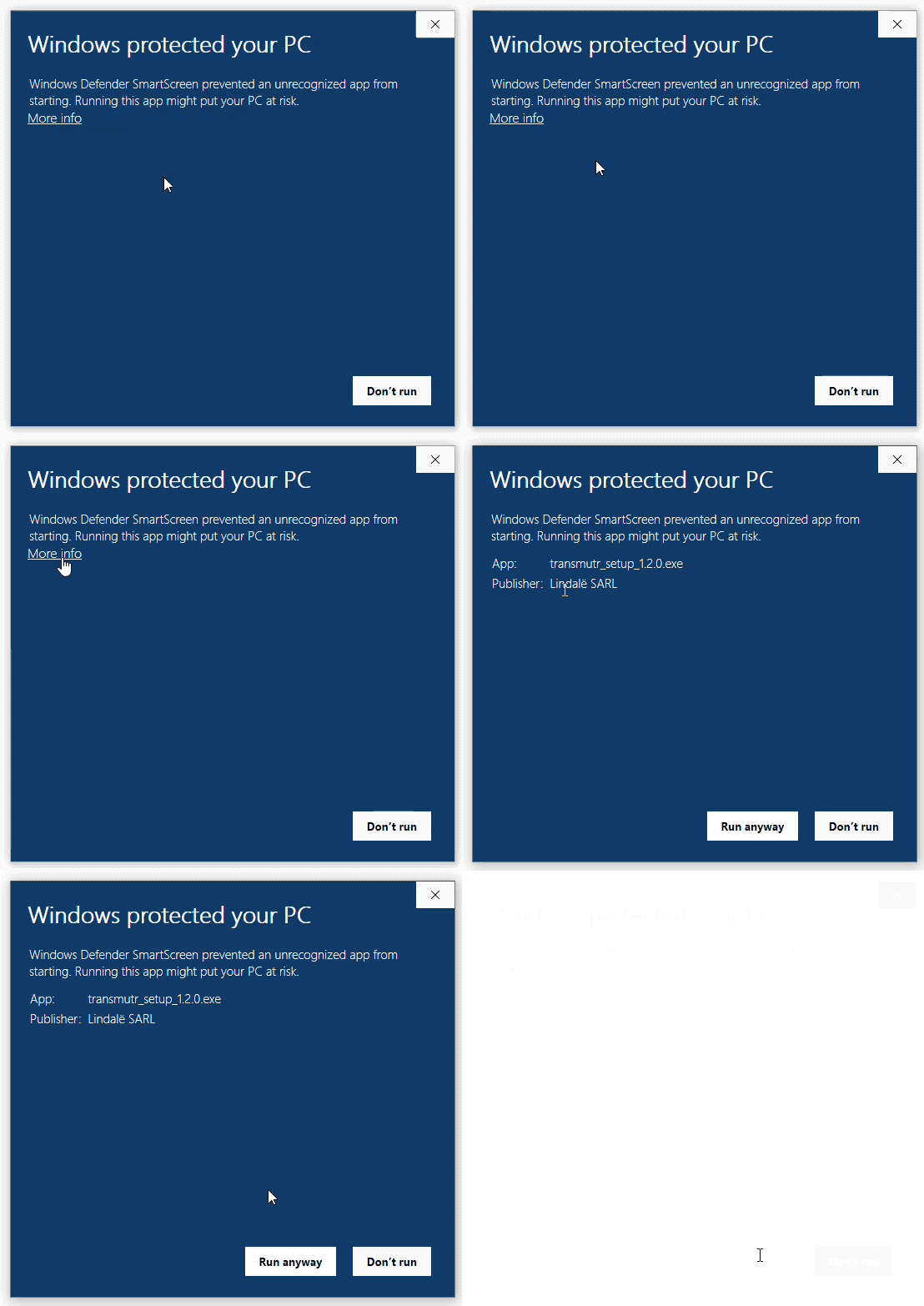
This message shows up because the app was downloaded from the Web, and this is what Windows does for apps downloaded from the web.
To bypass this,
Click "More Info"
Then click "Run anyway"
For Mac users!
STEP 2b. Install (IMPORTANT!!)
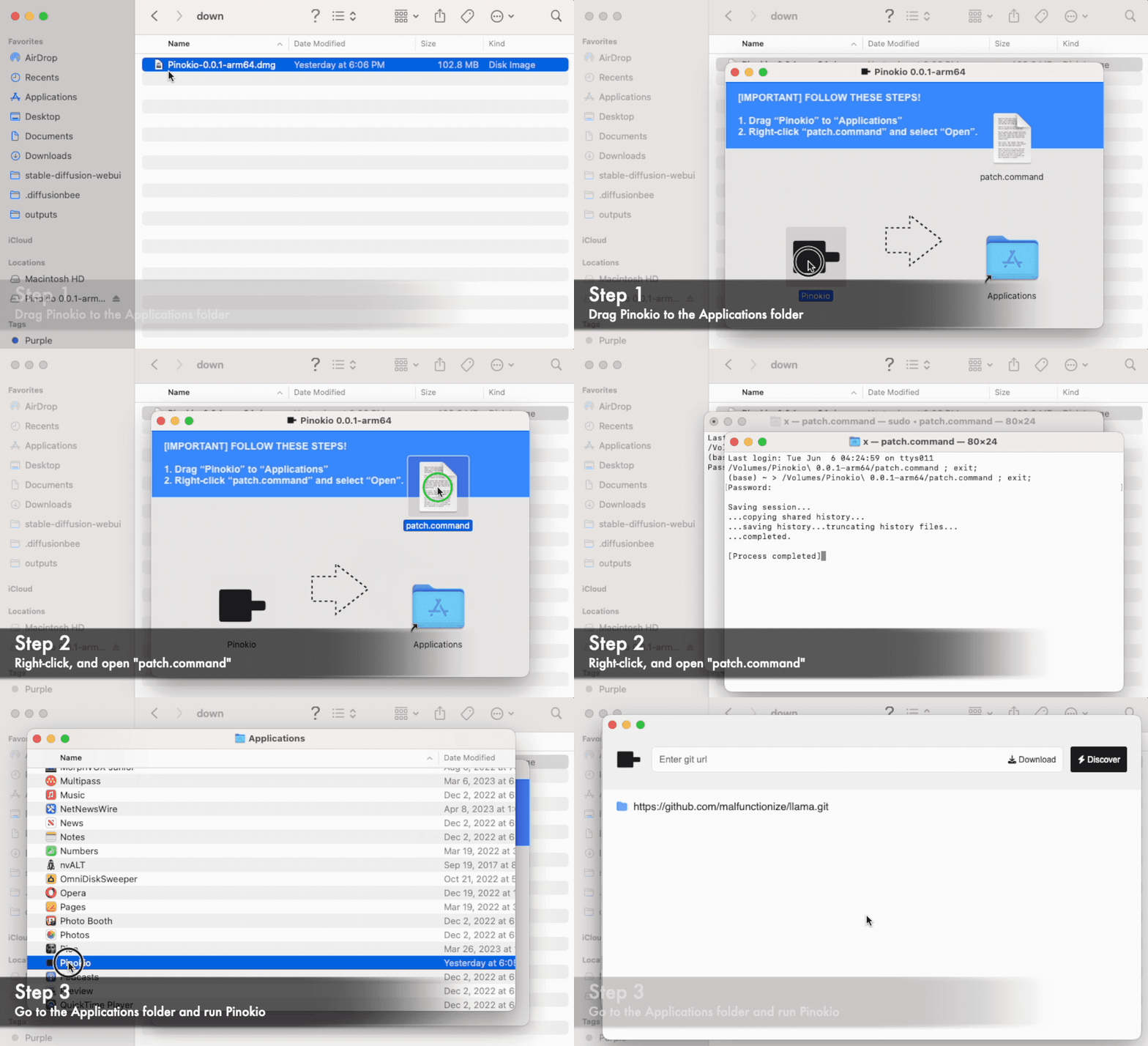
After downloading the dmg files, you MUST make a patch, as shown below:
Run the downloaded DMG installer file
Drag the "Pinokio" app to the Applications folder
Run the "patch.command"
Open the Pinokio app in the applications folder
*More About Pinokio:
Pinokio is a browser that lets you locally install, run, and automate any AI on your computer. Everything you can run in your command line can be automated with Pinokio script, with a user-friendly UI.
You can use Pinokio to automate anything, including:
Install AI apps and models
Manage and Run AI apps
Create workflows to orchestrate installed AI apps
Run any command to automate things on your machine
and more...
Here's what makes Pinokio special:
Local: Everything gets installed and runs locally. None of your data is stored on someone else's server.
Free: Pinokio is an open source application that is 100% free to use with no restriction. There is no one to pay for API access, since everything runs on your local machine. Play with AI as much as you want, for free forever.
Private: You don't need to worry about submitting private data just to run AI, everything runs 100% privately on your own machine.
User-friendly Interface: Pinokio provides a user-friendly GUI for running and automating anything that you would normally need to use the terminal for.
Batteries Included: Pinokio is a self-contained system. You do not need to install any other program. Pinokio can automate anything, including program/library installations. The only program you need is Pinokio.
Cross Platform: Pinokio works on ALL operating systems (Windows, Mac, Linux).
Save Storage and Resources: Pinokio has a lot of optimization features that will save you hundreds of gigabytes of disk space. Also, many other resource optimization features (such as memory) all possible with Pinokio.
Expressive Scripting Language: Pinokio script is a powerful automation scripting language with features like memory, dynamic templating, and extensible low level APIs.
Portable: Everything is stored under an isolated folder and everything exists as a file, which means you can easily back up everything or delete apps simply by deleting files.
Comments
Pinokio has forced me to reset the installation of ComfyUI several times. I now just use it for other apps, not ComfyUI, which I rum as a portable installation. Besides, you don't mention it, but Pinokio is also available for GNU/Linux.
Relatos para escuchar
2024-11-12 17:38:33 +0000 UTCPinokio is so good. I've been running all of my different use cases as their own Envs.. It's been good.
Finn Negrello
2024-09-23 01:01:43 +0000 UTC